Crawl Budget – What It Is, Why It Matters & How to Improve It
You published 50 new pages last month. Google found 12 of them. The rest are sitting invisible, not ranking, not driving traffic — and you have no idea why.
The answer, in most cases, is crawl budget — and understanding it is the difference between a website Google actively explores and one it quietly ignores.
What is Crawl Budget?
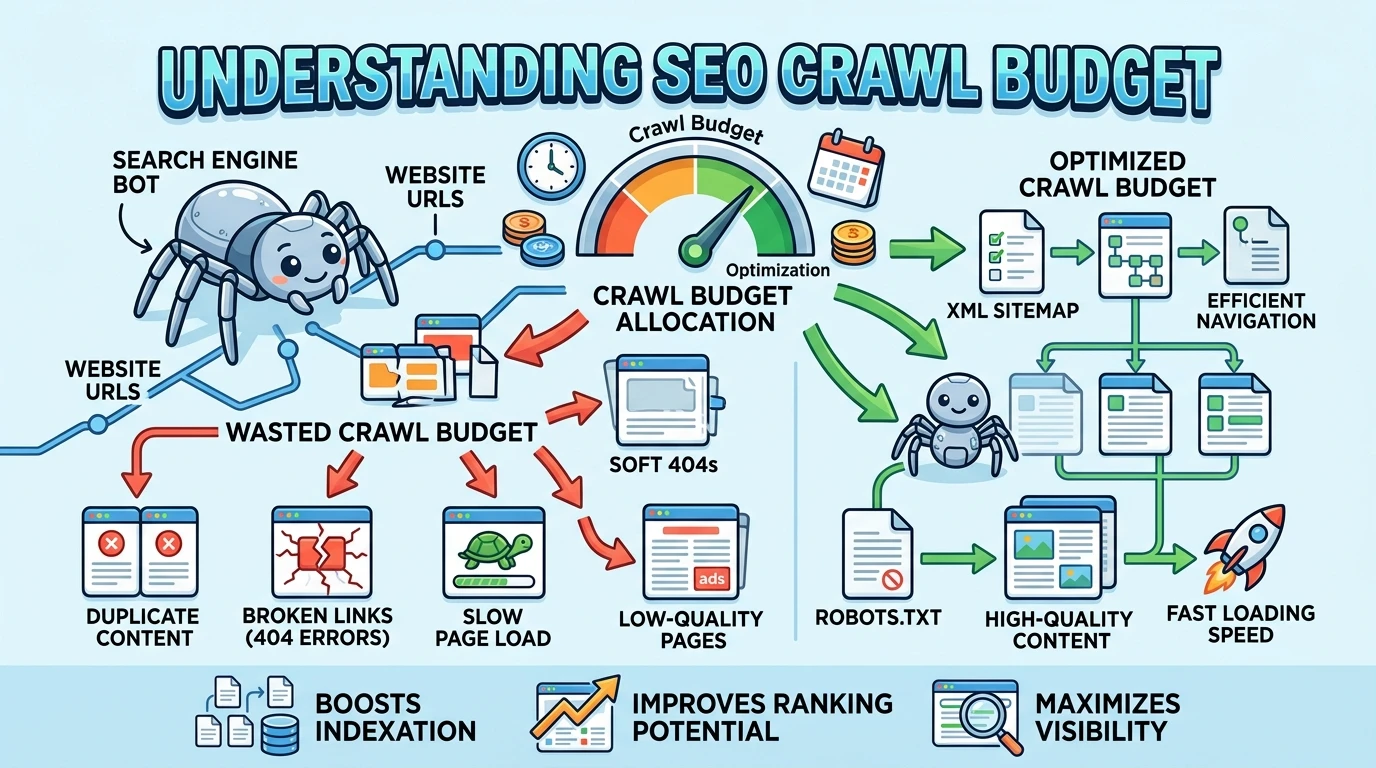
Crawl budget is the number of pages a search engine bot crawls on your website within a given time period.
Google does not crawl your entire website every single day. It has limited time and resources. So it decides which pages to visit, how often to visit them, and which ones to skip. That decision-making process is controlled by your crawl budget.
Purpose: Crawl budget determines how many of your pages get discovered and kept fresh by Google — which directly affects how many of your pages can rank.
One important truth to understand right away: not every website needs to worry about crawl budget.
A blog with 30 pages is almost never affected.
But an e-commerce store with 80,000 product pages?
Crawl budget is a critical factor that decides which products Google ever sees.
Simple example: a site with 10 pages gets fully crawled with no problems. A site with 100,000 pages — Google may crawl only 40,000 of them in a given period. The other 60,000 pages sit undiscovered or go without updates for weeks.
Why Crawl Budget Exists
The Core Problem: Google Cannot Crawl Everything
The internet has over a billion websites. Google’s crawling bot — called Googlebot — visits websites constantly, but it cannot be everywhere at once. Every time Googlebot visits your website, it uses computing resources, bandwidth, and time.
Crawler traffic is rising across both traditional search and AI systems. Cloudflare reported that AI and search crawler traffic grew 18% from May 2024 to May 2025, with Googlebot up 96% and GPTBot up 305% during that period.
More bots competing for the same server resources means Google has to be more strategic than ever about which pages it crawls and how often.
Why It Matters for Your Website
For small websites, crawl budget is not a daily concern. For larger sites — especially e-commerce stores, news portals, and content-heavy platforms — crawl budget directly controls visibility.
Here is the real-world problem: imagine you run a furniture e-commerce site. You have 10,000 product pages. You also have thousands of filter combinations — sort by price, sort by color, sort by size — each generating a unique URL. Google’s bot arrives at your site and spends most of its crawl budget on those useless filter URLs. Your actual product pages never get crawled. They never get indexed. They never rank.
That is not a content problem. That is a crawl budget problem.
How Crawl Budget Works
Crawl budget is made up of two separate things working together. Most people only know one of them.
Crawl Rate Limit: How Fast Google Can Crawl
Crawl capacity is how many concurrent requests your server can handle without performance degradation. When responses are fast and error-free, the crawler widens its pipeline; when latency or 5xx errors rise, it backs off to protect the site.
Think of it this way. Google wants to crawl your site, but it also does not want to crash your server. So it tests your server’s response speed. If your server responds fast, Google crawls more pages. If your server is slow or keeps returning errors, Google slows down — and crawls fewer pages.
Example: your hosting server is slow and takes 3 seconds to respond to each request. Google sees this and reduces how many pages it visits per day so it does not overload your server. Your crawl rate drops. Fewer pages get crawled.
Crawl Demand: How Much Google Wants to Crawl Your Pages
Crawl demand is about how interesting and important Google thinks your pages are.
Crawl budget mainly relies on two important factors: crawl capacity limit and crawl demand.
Pages that are popular, frequently updated, and well-linked internally get crawled more often. Pages that are old, thin, or never linked to get crawled rarely — or not at all.
Factors that increase crawl demand for a page:
- It gets a lot of organic traffic
- It is updated frequently with new content
- Many internal links point to it
- It has strong backlinks from external sites
Factors that decrease crawl demand:
- The page has thin or duplicate content
- No internal links point to it
- It has not been updated in months or years
- It generates no traffic or engagement
Example: your homepage gets crawled almost every day. An old blog post from three years ago with zero traffic gets crawled once a month at best.
How Google Allocates Crawl Budget Across Your Site
Google does not treat every page the same. It makes intelligent decisions about where to spend its crawl budget.
High-Priority Pages: What Google Crawls Most
Google gives more crawl budget to pages that:
- Are linked from many other pages on your site
- Are updated regularly with fresh content
- Are close to your homepage (reachable in two or three clicks)
- Generate strong organic traffic signals
Your homepage, main category pages, top-performing product pages, and recently published articles all fall into this group.
Low-Priority Pages: What Google Skips
Google gives very little crawl budget to pages that:
- Have duplicate or near-duplicate content
- Are thin — very little actual content
- Are generated automatically by filters or URL parameters
- Are buried deep in your site structure (five or more clicks from the homepage)
- Have no internal links pointing to them
Crawl Frequency Differences in Practice
A well-optimized, important page might get crawled every 24 to 48 hours. An outdated, low-value page might get crawled once every few weeks — or get skipped entirely for months.
In 2025, the crawl budget is less about how much content you have and more about how well your infrastructure performs. Google does not penalize large websites — it penalizes inefficient ones.
Signs Your Website Has a Crawl Budget Problem
Most website owners do not know they have a crawl budget issue until they look at the data. Here are the clearest warning signs.
You publish new pages but they do not appear in Google search for weeks. If a new product page or blog post takes 3 to 4 weeks to show up in search results, Google is not crawling your site frequently enough.
Google Search Console shows a large number of “Discovered — currently not indexed” pages. This means Google knows the pages exist but has not crawled them yet. It is queued them but never gotten around to visiting.
Your indexed pages are far fewer than your total pages. If you have 20,000 pages but only 8,000 are indexed, crawl budget waste is almost certainly part of the reason.
Example: you publish 50 new articles in one month. Only 10 appear in Google Search Console as indexed after two weeks. The other 40 are in a queue — waiting for Google to crawl them. That wait time is your crawl budget problem showing up in real life.
Common Crawl Budget Problems (And What Causes Them)
Duplicate URLs
This is the biggest crawl budget killer on most large sites. The same content appears at multiple URLs — and Google wastes crawl budget visiting all of them.
Pages that are duplicate, low-value, orphaned, or part of long redirect chains typically consume significant crawl budget. Dynamic URLs with parameters and automatically generated CMS pages can also contribute to wasted crawling resources.
Common causes: URL parameters for sorting and filtering (like ?sort=price&color=red), HTTP vs HTTPS versions of the same page, URLs with and without trailing slashes (/page vs /page/), and session IDs added to URLs for tracking.
Orphan Pages
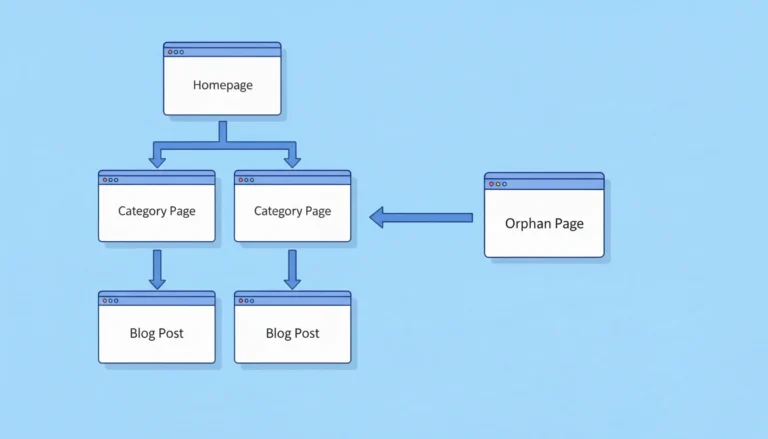
An orphan page is a page no other page on your site links to. Google discovers pages by following links. If no page links to a specific page, Googlebot may never find it — regardless of how good the content is.
Example: you create a landing page for a product launch but forget to link to it from your main navigation or any blog posts. Google finds your sitemap, sees the URL, but never follows internal links there. It gets crawled rarely and gets almost no priority.
Low-Quality and Thin Pages
Pages with very little content — product pages with only a title and price, tag archive pages with two posts, auto-generated location pages with identical content — drain crawl budget without giving Google anything worth indexing.
Google’s algorithm recognizes thin pages quickly. It reduces how often it visits them, which means that crawl budget gets spent on low-value content instead of your important pages.
Broken Links and Server Errors
Every time Googlebot follows a link that leads to a 404 (page not found) or a 500 (server error), it wastes a crawl on a dead end. On large sites, hundreds or thousands of broken links can drain a meaningful portion of crawl budget every single day.
Redirect chains make this worse. A redirect chain happens when URL A redirects to URL B, which redirects to URL C. Each hop wastes crawl resources and slows down how efficiently Google moves through your site.
Infinite URL Spaces
This is the most dangerous crawl budget trap for e-commerce and large content sites.
Faceted navigation — where filtering systems lead to new URLs being created — can result in enormous numbers of new URLs unless you stop the bots from crawling them. Even an events calendar with navigation to future months can create a “bot trap” where crawlers follow links indefinitely into the future.
An e-commerce site selling shoes might have: shoes by size, shoes by color, shoes by brand, shoes by price range — each combination creating a unique URL. A site with 500 products could generate millions of filter-combination URLs. Google gets trapped crawling an endless maze of near-identical pages.
How to Optimize Crawl Budget: Step by Step
Step 1: Improve Internal Linking
Internal links are how Google navigates your site. The more internal links pointing to a page, the more important Google considers it — and the more crawl budget it allocates to it.
Audit your most important pages. Count how many internal links point to each one. Any important page with fewer than three internal links pointing to it needs more. Add links from your highest-traffic pages to your important but under-linked pages. This directly increases crawl priority for those pages.
Step 2: Fix Duplicate Content With Canonical Tags
A canonical tag tells Google: “This is the main version of this page. Ignore the others.” Add canonical tags to every page that has duplicate or near-duplicate versions.
For URL parameters specifically — if your e-commerce site generates filter URLs like ?color=blue&size=medium — set canonical tags on all parameter variations to point back to the main category page. This tells Google to stop crawling the filter versions and focus on the clean URL.
Step 3: Remove or Noindex Low-Value Pages
Identify pages that get zero traffic, have thin content, and serve no real purpose for users or search engines. You have two options: delete them (and redirect to a relevant page) or add a noindex tag so Google stops spending crawl budget on them.
Common candidates: empty tag pages, paginated archive pages beyond page 3, auto-generated location pages with duplicate content, internal search result pages, and outdated blog posts with no traffic and no unique value.
Step 4: Control URL Parameters
Go to Google Search Console and use the URL Parameters tool to tell Google which parameters to ignore. For example, tell Google that ?sort= and ?ref= are not meaningful — they do not create unique content. Google will stop crawling those parameter variations.
Alternatively, block parameter-generated URLs in your robots.txt file if they produce no indexable value at all.
Step 5: Fix All Crawl Errors
Export all 404 errors from Google Search Console and Screaming Frog. Redirect each broken URL to the most relevant live page using a 301 redirect. Collapse redirect chains — if a URL goes through three redirects, update it to go directly to the final destination in one step.
This alone can recover a significant portion of wasted crawl budget on large sites.
Step 6: Improve Server Speed
Optimise server response time by reviewing database indexes, compressing assets, and tuning TLS handshakes. Return 304 Not Modified when content is unchanged to save bytes and crawler time. A faster server means Google can crawl more pages in the same time period.
Target a server response time (Time to First Byte) of under 200 milliseconds. Anything above 500 milliseconds will reduce your effective crawl rate.
Crawl Budget vs Indexing: Understanding the Difference
These two are connected but not the same thing. Confusing them leads to the wrong fixes.
Crawl budget controls how many pages Google visits. If a page is never crawled, Google does not know what is on it.
Indexing is what happens after Google crawls a page — it decides whether to store that page in its search database and show it in results.
A page can be crawled but not indexed. This happens when Google visits the page but finds it has thin content, duplicate content, or a noindex tag. It crawled the page but chose not to index it.
A page can also be discovered (found in a sitemap) but never crawled. Google knows it exists but has not gotten around to visiting it — that is a crawl budget problem.
| Situation | Crawl Budget Problem? | Indexing Problem? |
|---|---|---|
| Page never visited by Google | Yes | No (not reached yet) |
| Page visited but not in search results | No | Yes |
| Page in sitemap but never crawled | Yes | No |
| Page crawled, shows “noindex” | No | Yes |
| New page takes weeks to appear | Possibly | Possibly both |
Crawl Budget and Site Size
Small Websites: Usually Not a Problem
If your website has fewer than a few thousand pages and your server is reasonably fast, crawl budget is almost never the issue. Google will crawl your entire site regularly without any optimization needed.
Focus your energy on content quality and link building instead.
Large Websites: This Is Critical
For sites with tens of thousands or hundreds of thousands of pages — e-commerce stores, news sites, real estate platforms, travel booking sites, job boards — crawl budget is one of the most important technical SEO factors.
According to Gary Illyes at Google, the one million page mark is where crawl budget starts to matter most. However, even sites well under one million pages with poor server performance or database inefficiencies can experience slower crawling and delayed indexing issues that directly affect visibility in search.
The moment your site scales past a few thousand pages, start monitoring crawl budget actively.
How Crawl Budget Affects Your SEO
Crawl budget is not a direct ranking factor. Google has confirmed this. But it affects SEO in two very real indirect ways.
First: a page that is never crawled cannot be indexed. A page that is not indexed cannot rank. The relationship is that direct.
Second: crawl frequency affects how quickly your updates appear in search. If you update a product page with new pricing or update a blog post with better information, those changes only show up in Google after the next crawl. SEO accounts for 54% of web traffic versus 28% for paid search — and all of that organic traffic depends on Google being able to crawl and index your pages efficiently.
Slow crawling means delayed rankings — and delayed rankings mean delayed revenue.
A news site that publishes time-sensitive articles cannot afford to wait three weeks for those articles to appear in Google. A retail site running a limited-time sale cannot wait for Google to discover the updated prices. Crawl budget efficiency directly affects how fast your website reflects reality in search results.
Tools to Analyze Your Crawl Budget
Google Search Console — Crawl Stats Report
This is your most important tool. The Crawl Statistics report in Google Search Console tells you precisely the crawl statistics of the last 90 days and lets you find out how much time the search engine spends on your site. It shows total crawl requests over time, response times, and which file types Google is crawling most.
Go to Search Console → Settings → Crawl Stats. Look for sudden drops in crawl requests (a sign of server issues) and spikes in response time (a sign your server is struggling).
Google Search Console — Page Indexing Report
The Page Indexing report shows the ratio between your site’s indexed and unindexed pages. The status “Discovered — currently not indexed” is your first indication that pages do not meet Google’s crawling criteria.
A large number of pages in this “discovered but not indexed” state is a clear crawl budget warning sign.
Crawls your website the same way Googlebot does. Finds orphan pages, broken links, redirect chains, duplicate content, and URL parameter issues. The free version handles up to 500 URLs. For larger sites, the paid version is essential for crawl budget analysis.
Log File Analyzers (Screaming Frog Log Analyzer, Splunk)
Server log files show you exactly which pages Googlebot visited, how often, and which pages it skipped entirely. This is the most direct way to see your actual crawl budget usage — not estimated, but real bot behavior recorded on your server. For any site above 10,000 pages, log file analysis should be part of your monthly SEO review.
Real-World Example: 50,000 Pages, Only 20,000 Crawled
Here is a scenario that plays out on large websites constantly.
An e-commerce website sells outdoor equipment. They have 50,000 pages — 30,000 products and 20,000 filter and parameter URL variations created by their faceted navigation (filter by brand, size, color, price range, availability).
The problem discovered:
- Google Search Console shows only 20,000 pages crawled regularly
- 15,000 pages are in “Discovered — currently not indexed” status
- 8,000 of those are new product pages published in the last 6 months that have not ranked yet
The diagnosis:
- 18,000 filter URLs are consuming a huge portion of crawl budget
- 3,000 orphan pages (seasonal collections) have no internal links
- 2,000 pages have duplicate content from multiple URL structures
- Server response time averages 800 milliseconds — above the threshold for efficient crawling
The fixes applied:
- Canonical tags added to all filter URL variations pointing to clean category pages
- robots.txt updated to block parameter URLs from being crawled entirely
- Internal links added to the 3,000 orphan seasonal pages from the homepage and relevant blog content
- Server optimized — response time reduced to 190 milliseconds
- 500 genuine thin pages deleted and redirected to parent categories
The result after 90 days:
- Pages crawled per day increased by 60%
- Indexed pages grew from 20,000 to 38,000
- The 8,000 new product pages that were stuck in the discovery queue began appearing in search results within 2 to 3 weeks instead of months
This is not a hypothetical. This exact pattern is one of the most common technical SEO problems on large sites.
Crawl Budget Checklist
Use this to audit your site for crawl budget problems.
Internal Linking
- Are all important pages linked from at least three other pages on your site?
- Are any important pages orphaned (no internal links pointing to them)?
- Can Google reach every important page in four clicks or fewer from your homepage?
Duplicate and Parameter URLs
- Do you have URL parameters creating duplicate versions of pages?
- Are canonical tags set correctly on all duplicate URL variations?
- Have you blocked low-value parameter URLs in robots.txt or Search Console?
Low-Value Pages
- Are thin pages (fewer than 300 words of unique content) removed or noindexed?
- Are auto-generated tag, archive, or filter pages that serve no unique purpose noindexed?
Crawl Errors
- Have you fixed all 404 errors with 301 redirects?
- Are there redirect chains on your site that need collapsing to a single hop?
- Are there server errors (5xx) appearing in your crawl stats?
Server Performance
- Is your Time to First Byte (TTFB) under 200 milliseconds?
- Is your server stable without frequent timeouts or errors?
Monitoring
- Are you checking your Google Search Console Crawl Stats report monthly?
- Do you know how many pages are currently in “Discovered — currently not indexed” status?
Frequently Asked Questions
What is crawl budget in simple terms?
Crawl budget is the number of pages Google is willing to crawl on your website within a given period of time. Google has limited resources and cannot visit every page on every website every day. Crawl budget is how Google decides which pages get its attention — and how often.
How does crawl budget work?
Crawl budget is controlled by two factors. First, crawl rate limit — how fast your server can respond to Google’s requests. Second, crawl demand — how interesting and important Google considers your pages. Fast servers and high-quality, well-linked pages get more crawl budget. Slow servers and duplicate, thin pages get less.
Does crawl budget affect SEO?
Yes, indirectly. Crawl budget itself is not a ranking factor, but if Google never crawls your pages, they cannot be indexed — and pages that are not indexed cannot rank. Crawl budget also controls how quickly your updates appear in search results. Fixing crawl budget problems helps important pages get discovered and indexed faster.
How do I increase my crawl budget?
You do not directly increase crawl budget. You improve how efficiently it is used. Fix duplicate URLs with canonical tags. Remove or noindex thin pages. Improve server speed. Add internal links to important pages. Block low-value parameter URLs. When Google spends less budget on junk pages, it has more budget available for your important ones.
Do small websites need crawl budget optimization?
Almost never. If your website has fewer than a few thousand pages and your server is reasonably fast, Google will crawl it fully without any special optimization. Crawl budget becomes a real concern when your site grows past 10,000 pages — and becomes critical above 100,000 pages.
What is the difference between crawl budget and crawl depth?
Crawl budget refers to the total number of pages Googlebot can and will crawl on your site within a given timeframe, while crawl depth measures how many clicks it takes from the homepage or another key entry point to reach a specific page. Optimizing both ensures important pages are discovered quickly and efficiently.
How do I know if I have a crawl budget problem?
Check Google Search Console’s Crawl Stats report and Page Indexing report. Warning signs include: many pages with “Discovered — currently not indexed” status, new pages taking weeks to appear in search, indexed pages being far fewer than your total page count, and a crawl requests graph that has been dropping over time.
Most technical SEO conversations jump straight to content and backlinks. But if Google is spending its crawl budget on filter URLs, orphan pages, and broken links, your best content sits in a queue — undiscovered, unindexed, and unranked.
Clean up the waste first. Audit your duplicate URLs this week, check your Page Indexing report in Search Console, and measure how many pages are stuck in “discovered but not indexed.” Fix those problems, and every page you publish from today forward gets found faster, indexed sooner, and ranked quicker. That is the real value of understanding crawl budget — and it is sitting in your Search Console right now waiting for you to act on it.

Senior SEO Analyst with 5+ years experience. I specialize in Local SEO, Technical SEO, and AI search visibility through AEO and GEO strategies. Everything I write is tested against real search performance, not borrowed from someone else’s playbook.